Invoices, Payment Links, Checkouts, or API: which EukaPay product fits your business?
May 14, 2026
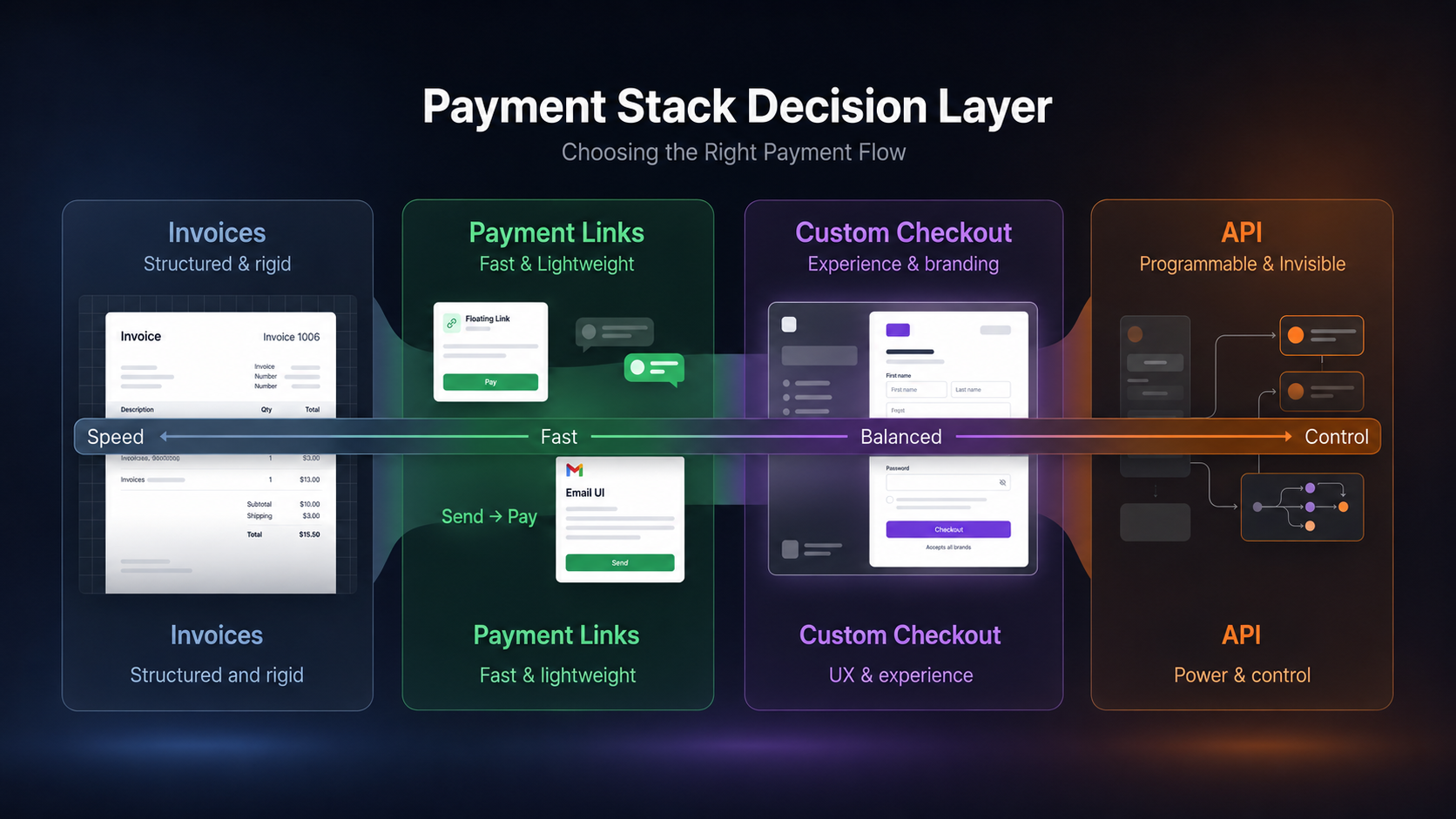
A company who needs to invoice a buyer for goods or services delivered, has a different payment problem than an e-commerce platform processing a thousand orders a day. Both need to accept crypto. Neither should use the same tool. The platform offers four ways to accept stablecoins or crypto payments online:
,
,
, and the
. Each one is purpose-built for a specific operation. Pick the right one for your customers and use-case.
In this guide, you'll learn:
The differences between Invoices, Payment Links, Custom Checkouts, and the API
Which one fits one-off requests, embedded payments, and high-volume automation
How most growing businesses end up combining more than one
Quick answers to the most-asked product questions
Invoices and Payment Links
Of all four products, Invoices and Payment Links are most similar. Both let a merchant create a payment request for a specific amount and send a customer a link to complete it. No code. No setup. Each takes under a minute.
The difference isn't what they do. It's how they reach the customer.
Payment Links - you share the link
Payment Links are for merchants who want to deliver the request themselves. You generate a link and drop it wherever makes sense: pair this with a Xero or Quickbooks invoice, or send directly via a WhatsApp message, email, Slack thread, or add it to an Excel or PDF invoice you generate. The link is portable.
This makes Payment Links the right fit for direct, informal, or ad hoc collection - situations where you control the channel and the context. Companies, freelancers and consultants accepting crypto on the fly tend to utilize this.
Invoices - EukaPay sends the email
Invoices is a friendly user-interface where you enter the amount, add line items, and your customer’s information. EukaPay sends a formatted PDF invoice to their inbox with the payment link embedded. The customer reviews the invoice, follows the payment screens to pay, and the funds settle to your dashboard. You never have to compose the email or chase whether it landed.
The practical split: a company or freelancer who prefers to send their own emails reaches for Payment Links. A business that wants EukaPay to handle delivery - and a clean paper trail attached to every transaction - uses Invoices.
Both are built for the same shape of business: one-to-one payment requests, initiated by the merchant, directed at someone who already knows they owe you money. They are not designed for anonymous traffic landing on your website. For that, you'll want one of the next two options.
Custom Checkouts
sit between a payment link and a full API integration. You build a branded checkout page with custom fields and embed it directly on your website, so customers can pay without leaving your domain.
Low-code, not no-code
You design the checkout in EukaPay's dashboard, add the fields your business needs (name, email, donation designation, anything else), apply your branding, and drop the embed snippet onto your site. A basic comfort with editing a webpage is enough. You don't need a developer - but you do need to be willing to paste an embed.
Where it fits
Where Invoices and Payment Links go out to specific people, Custom Checkouts wait for customers to find them. A donation button on a charity's site. A ticket purchase flow on an event page. The checkout is always on, always available, always presenting your brand to whoever lands on it.
The most natural fit is donations.
Charities and non-profits accepting crypto
embed the checkout, a visitor fills in their name, email, and amount, and the payment completes in crypto. The funds settle to the merchant's EukaPay dashboard.
is another strong fit.
One limitation to know
Because the checkout is embedded — not tied to an account system — there's no automated way to match a payment to a specific customer record. You'll receive the email the payor entered, but follow-up, receipts, and reconciliation against donor or customer records is manual. If payments need to flow into an existing account or CRM automatically, the API is the right tool instead.
The API
The
is for businesses that need crypto payment processing embedded into their existing systems. It's built for developers and requires some development. In exchange, it offers what no other product can: full automation at any scale.
What you can do with it
Through the API you can programmatically create invoices, generate payment requests tied to specific orders, manage subscriptions, trigger payouts, and receive real-time transaction notifications via webhooks. Every action available in the EukaPay dashboard can be triggered through the API - without a person clicking anything.
Who actually needs it
Businesses where payment creation cannot be manual:
A SaaS company billing hundreds of subscribers on recurring schedules.
A marketplace processing thousands of transactions between parties with different payout rules.
An
iGaming operation accepting crypto
where deposits and withdrawals run continuously, each tied to a specific account and session.
In all of these above, payments need to be system-generated vs. sent manually. EukaPay sets you up for success by providing a sandbox for testing, comprehensive
, and webhook support for instant notification when a transaction completes, fails, or needs attention.
What the API unlocks
The tradeoff is setup time. API integration needs a developer (or coding agent) and proper implementation. For businesses without dev resources or with simple payment needs, this product is not the best fit. For businesses where volume, complexity, or automation justify it, APIs offer the most flexibility and scalability with total control.
How to choose
Here's the picking heuristic in one table.
| Invoices | Payment Links | Custom Checkouts | API |
Who delivers the request? | EukaPay (via email) | You (share manually) | Customer finds it | System (automated) |
Coding required? | No | No | No (low-code embed) | Yes |
Custom fields? | No | No | Yes | Yes |
Best for | Billing specific clients | Direct, informal requests | Event Ticketing, Donations, Investments, Embedded payments | High-volume, automated systems |
Typical user | Companies, consultants, freelancers | Companies, consultants, freelancers | Event Organizers, Charities, Platforms | Ecommerce, SaaS, iGaming, Platforms |
Many businesses end up using more than one. A company might use Invoices for client billing, Payment Links for quick ad hoc requests, Custom Checkouts for the donation page on their site, and the API for their automated order system. The products aren't mutually exclusive - they're built to cover different operational contexts inside one platform.
One platform underneath
All four products share the same underlying infrastructure: instant crypto-to-fiat conversion at a locked exchange rate to remove all crypto volatility, protection against chargebacks, support for a wide range of cryptocurrencies, and settlement in USD, EUR, GBP, CAD to your bank account.
The choice amongst them is not about which is better. It's about which fits the shape of your business. A solo consultant and a high-volume e-commerce platform both benefit from accepting crypto, but they should not use the same tool to collect it.
For the wider picture on who's adopting these payments, see our roundup of
companies accepting crypto payments in 2026
.
Get started with EukaPay
and explore the dashboard, or
if you're ready to build.
Frequently asked questions
Should I use a Payment Link or an Invoice?
Use a Payment Link if you want to send the request yourself - over WhatsApp, email, or instant messaging. Use an Invoice if you want EukaPay to email the customer a formatted invoice with the payment link embedded.
Do I need the API for an e-commerce store?
If you run a high-volume store where every checkout creates a new payment request, yes - the API is built for that. For a low-volume store or one-off product sales, Payment Links or a Custom Checkout will get you started without development work. EukaPay also offers
for popular platforms.
Which API is most suitable for my business?
Common businesses that utilize EukaPay can be found in our Use-Cases section. You can also refer to the articles below to explore more:
Online gaming platforms offer players no-limit stablecoins and crypto deposits and withdrawals
Event organizers accept stablecoins and crypto payments for sponsorships and ticketing
eSIM provider offers users to top-up balances with stablecoins or crypto
More industries
Can a charity accept crypto donations without a developer?
Yes. A Custom Checkout embeds a branded donation form on your site without code, by copying and pasting one line of code we provide you. See
crypto donations for charities
for how to set up.
What cryptocurrencies and fiat settlements does EukaPay support?
EukaPay supports most major cryptocurrencies like BTC, ETH, LTC, SOL, USDC, USDT, and settles to your bank account in USD, EUR, GBP, or CAD.
What accounting integrations does EukaPay support?
Accounting integrations are available for Xero and QuickBooks. From our Transactions Table and Reporting, you can download and synchronize your books seamlessly with our accounting-friendly data. Check out our Accounting integrations.
Can I use more than one product at once?
Yes. Most growing businesses end up combining them - Invoices for client billing, Payment Links for ad hoc requests, Custom Checkouts for embedded site payments, and the API for automated systems.
Related articles
Crypto payments for charities and non-profits
- set up a branded donation page in minutes.
- full developer documentation for building on EukaPay.
Products
Use Cases
© 2026 EukaPay. All rights reserved.
FINTRAC: M22233887